Thursday, October 10, 2013
Only Value Info
0
comments
As indicated by enthusiasts around the Web, there is a simple way to access a hidden "God Mode" in Windows 7 and Vista. With a name like that, your expectations might be a little high -- and no, Windows is not secretly invincible -- but the trick is awesome nevertheless.
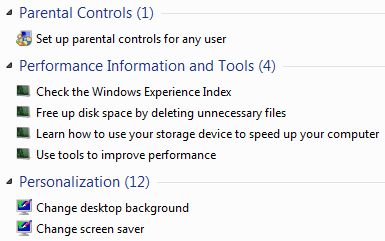
"God Mode" simply provides users with a centralized Control Panel for all of Windows' settings, from changing your desktop background to setting up a VPN or partitioning your hard drive. In all, there are nearly 50 categories and most have several entries.
It's almost comical how simple it is to access it:
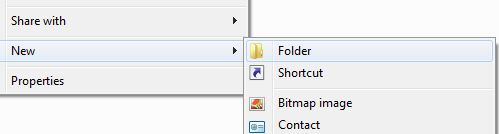
Create a new folder. Anywhere is fine, I created one on my desktop.
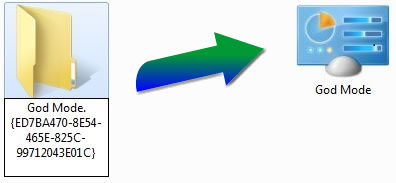
Rename the folder to: God Mode.{ED7BA470-8E54-465E-825C-99712043E01C} *Note: The "God Mode" chunk can be called anything you want.
The default folder icon will change to a Control Panel icon, and you can open it to view all of the settings.
User reports suggest that it may crash Windows Vista 64-bit, so proceed with caution. For what it's worth, I've successfully used the "feature" on Windows 7 Home Premium and Ultimate 64-bit.
As an additional note, having the undocumented feature disclosed all over the Web, Microsoft has decided to be more open about it admitting similar commands have been available even before Vista. They have also revealed other text strings that create similar "God Mode" folders, a list is available here.
Thursday, October 10, 2013
Only Value Info
0
comments
Microsoft is preparing a major update to Windows Phone, dubbed Windows Phone 8.1 or Windows Phone 'Blue', which is due to reach devices in 2014. According to well-known Microsoft expert Paul Thurrott, Windows Phone 8.1 might do something radical: kill the hardware back button.
According to Thurrott's source, Windows Phone users aren't fully familiar with the exact function of the back button, and prefer choosing new or previous apps through the Start button and home screen, rather than hitting the back button a number of times. To simplify things, Microsoft will apparently remove the back button from the Windows Phone 8.1 hardware specifications. This will create an iOS-like experience, where if there's a need to go back to the previous screen in an app, a back button will appear on screen.
The choice to remove the back button, if true, is an interesting one, because it provides access to the multitasking interface. While multitasking is said to receive a number of improvements in Windows Phone 8.1, if the back button is removed, Microsoft will need to find a new way to provide access to the app switcher.
Thurrott also indicates that Windows Phone 8.1 may bring support for 7- and 10-inch displays, sizes which are currently supported by Microsoft's ARM-based OS, Windows RT. This will produce an interesting crossover between Windows RT and Windows Phone, and it remains to be seen which one will be favored by OEMs if the rumor is true.
Other features to come in Windows Phone 8.1 may include universal binaries, which would give developers the ability to create a single app that runs on both Windows Phone and Windows RT, and the long-awaited notification center.
While Microsoft busily works on Windows Phone 8.1, the company is also set to shortly release Windows Phone 8 GDR3, which will bring a few minor changes and improvements to the platform. Most notably, GDR3 is said to bring support for 5- and 6-inch displays, as well as 1080p display resolutions, which will pave the way for devices such as Nokia's 6-inch Lumia 1520 smartphone
Thursday, October 10, 2013
Only Value Info
0
comments
Accordingto WinSuperSite, Microsoft is working on an update to Windows Phone 8 that would enable support for seven and ten-inch tablets.
Previous reports have suggested that the upcoming GRD3 update for Windows Phone 8 will bring support for five and six-inch smartphones. Currently, Windows Phone 8 devices are limited to four-inch screens.
There is no clear sign of when Windows Phone 8.1 is likely to arrive.
At the unveiling of the Xbox One, Microsoft stressed that it plans to unify its platforms. It said its plan is that an app created for the Xbox One will run onWindows 8 and Windows Phone 8 without it needing to be recoded.
It is possible Windows Phone 8.1 is Microsoft’s move to bring its mobile operating system in line with Windows 8.1 and the Xbox One.
According to reports, the larger screen sizes will be opt-in at first. Microsoft is understandably concerned about the perception that the fragmentation of Androiddevices has hurt the release of major apps.
Nike is one company that is understood to have held off developing an Android app for its Fuelband device because of the OS’ device fragmentation.
Other changes rumoured to be coming with the Windows Phone 8.1 update is the dropping of support for the back button. Up until now, developers have been required to include a back button to enable users to easily return to the homepage.
Most users are said to simply press the Windows button to return to their home page and as such, Microsoft has chosen to drop the requirement to streamline development.
The update is also said to fix several issues with WP8’s multitasking, including its notification system.
Nokia has announced it is readying new software updates for three handsets in its Windows Phone-powered Lumia range, containing numerous improvements and fixes.
The Finnish phone-maker has revealed that it will be rolling out firmware bumps for the Lumia 920, the Lumia 820 and the Lumia 620 in the coming weeks.
The Lumia 920 and 820 will receive firmware version 1232.5957.1308.00xx, which brings improved automatic display brightness adjustment, a fix for a bizarre issue where the screen intermittently goes blank during calls and various performance and stability improvements.
The Lumia 620, meanwhile, will get a much chunkier firmware update 1030.6407.1308.00xx, which adds improved touchscreen functions, including corrections in multi-touch action and better voice quality with Bluetooth headsets that support echo/noise reduction. It also comes with enhanced camera performance when flash is used and optimisations to system stability, usability and performance.
Nokia said that a notification will pop-up when the updates are ready for your handset, which will presumably be available as over-the-air downloads. The exact software version received (to replace the ‘xx’) will vary between different regions.
Have you had any issues with your Nokia Lumia handset? Tell us in the comments section below.
Nokia has debuted a new Lumia challenger, packing 4G support and a PureView camera.
Set to land first in the US, where it’s exclusive to Verizon, the Lumia 928’s main sell is its 8.7 megapixel camera.
That doesn’t sound like much compared with the 41-megapixel camera from the original PureView phone. And in truth probably isn’t so good that we can throw our SLR’s away, whatever Nokia claims.
But augmented by Carl Zeiss optics, a xenon flash and other features from on earlier PureView-branded kits, the snapper is certainly the standout spec here.
Elsewhere, the Lumia 928 packs a 4.5-inch OLED Gorilla Glass screen, the latest Windows Phone 8 version of Microsoft’s OS, 32GB of internal storage and a dual-core 1.5GHz processor to keep things ticking over.
Nokia is also making much of the phone’s audio capture smarts, which it claims keep distortion to a minimum, and loudspeakers that are purportedy capable of playback at 140 decibels.
Matt Rothschild, vice president of Nokia North America, said: “Whether you’re attending a party, a concert or a sporting event with friends, the Nokia Lumia 928 excels at capturing high-quality video, audio and blur-free photos of life’s most share-worthy moments.”
Nokia is set launch the European version of the phone on Tuesday, when we’ll also learn which UK carriers are offering the phone
Wednesday, May 08, 2013
Only Value Info
0
comments
You can do a whole lot more than watch your favorite sports on television these days if you take advantage of a second screen. The concept is simple: The big TV screen provides the visual action, while your laptop or tablet dishes out in-depth analysis and social media commentary on the side. Windows 8 has some nice apps for that.
Let’s take a look at the top five Windows 8 team- and sport-agnostic, free sports apps.
About the Ecosystem
Windows apps can be obtained from the Windows 8 Store, which can be accessed only within Windows 8.
Click or touch the Start page Store tile and then browse.
You can search by placing your mouse pointer or finger in the bottom-right corner of the screen and selecting the Search charm.
1. ESPN App
This ESPN app is rated 3+ stars beyond a possible 5 with 4, 350 ratings in the Microsoft windows 8 Store.
This, the sister app for the ESPN sports television channel, helps you dual-screen by keeping one eye in your tablet or PC and one about the big screen.
The app provides the latest scores and analysis for numerous sporting events. Alerts and updates can always be tied into live Windows 8 tiles also. Linking to a personal bill wraps the package.
2. Bing Sports
The Bing Sports app is rated 3+ stars out of a possible 5 with 1,067 ratings in the Windows 8 Store.
Bing Sports, called “Sports” in the app store, has an advantage: It’s already installed as an app within Windows 8, so it’s easy to check it out — look for its tile on the Start page.
The app includes a comprehensive set of sports and player headlines linking to news stories, video snippets, slide shows and major sports schedules. Additionally you can set up and track a favorite team.
3. Buzztap
The Buzztap app is rated 3+ stars out of a possible 5 with 11 ratings in the Windows 8 Store.
Buzztap is an intriguing concept. It provides you with a bunch of tiles that reference the latest trending sports topics.
Click on a tile — for example, Tiger Woods in the Golf category — and media references to the topic appear. In this case, you’ll see news articles and tweets about the player.
A trending category lets you see what’s hot.
4. PlayUp
PlayUp is usually rated 3 stars out of a possible 5 with one rating within the Windows 8 Store.
PlayUp is an aggregator of Twitter for, You Tube video, news, radio stations, and images associated with specific sports and situations. The app claims to produce key stats for over 55, 000 live online games, but its strength is which it pulls together each of the action and social network into one interface.
We found the app just a little lacking in social network feeds at certain times, but the concept is sound and a must have if you’d like to see where sports blog are headed.
5. Yahoo Sports
The Yahoo Sports app is rated 4+ stars out of a possible 5 with four ratings in the Windows 8 Store.
Within the app, you’ll get live NBA, NFL and NCAAF only. For other sports, you’ll need a Web browser, but the app does provide play-by-play descriptions and exclusive blog commentary.
Source: TechNewsWorld
A teams and standings roster and a schedule round out the mix. Yahoo Sports is a solid app, but it gets a runner-up position due to the limited number of sports included.
Want to Suggest an Apps Collection?
Is there a batch of apps you’d like to suggest for review? Remember, they must all be for the same platform, and they must all be geared toward the same general purpose. Please send the names of five or more apps to me, and I’ll consider them for a future All Things Appy column.
And use the Talkback feature below to add your comments!
Wednesday, May 08, 2013
Only Value Info
0
comments
The Blue Experience is a Facebook Phone designed by Tolga Tuncer follows newly developed Facebook Apps that work on a dedicated FB phone. Its boasts attractive blue saturated aluminum casing (17.5 cm x 5.5cm), which reminds us of a wedge.The marvelous display with its size and aspect ratio is optimized for the new Facebook core app OS. The interactive concept aims at connecting, communicating and sharing. The device features new developed camera button with LED-flash, an internal speaker output, a headphone connection, a message income notification element on the top, the Like-Button; ear-speaker phone and micro is at the back so you have to turn the phone to make calls.
a triple boot phone that runs iOS, Android and Windows Phone. This is supposed to be a quad core handset with 2GB of RAM and lots of storage. It also has a common Home button, something present on all the modern smartphones, no matter if they run Android, iOS or WP 7.
The search buttons were eliminated since they were considered unnecessary and the menu button in Android was also considered optional, while the Back button is replaced by an action that involves swiping your finger through the Home button. To me the design of this phone looks a bit like a combo between the Samsung Omnia 7 and the Nokia Lumia 900, if you want, with a hint of Galaxy S II. Of course, it will never happen, since Microsoft, Google and Apple will never agree to have their operating systems placed on a single device.
Imagine the port work, corrupted files, errors and problems that this device would encounter… Well, at least on the latest BlackBerry tablets you can run Android apps, so in the future BB OS and Android may become one… I’d certainly like all Lumia phones to offer Android as second boot option.
the blue Facebook Phone shown below is much longer than it is wide, something that users of today’s large phones won’t appreciate. Just look at the Galaxy Note and HTC Titan for example and you’ll see huge width. And now meet a brand new Facebook concept phone:
The Blue Experience phone has an Instagram button and comes with a blue saturated aluminum casing (17.5 x 5.5 cm). It’s designed in as a wedge and the display is easy to view even when the handset is flat on the table. The display size and aspect ratio are optimized for the new Facebook core app OS. This social networking hub is all about communicating and sharing information and content.
At the top of the Facebook Phone we have an incoming message notification area and a button that allows access to the messaging center directly. There’s also an internal speaker output in here, audio jack and big old Like button at the front, like some sort of Home button. At the back there’s a camera with LED flash and Spotify is also integrated into this experience with a dedicated button on the left side. I think that this model is a bit too long to use… What do you think?
The Steaur 1, 2 and 3 are all Windows Phone 8 models, each with an unique design. We being with Steaur 1, pictured below and looking pretty hot.
This model somehow reminds me of the iPhone, but also a bit of the Nokia N9. I like its profile and edges of the screen, with a nice elegant touch to them, thanks to that special glossiness. The camera is integrated at the back in a very simplistic way. If I’m getting this right, the handset has a big speaker at the top and another big one at the bottom. Steaur 2 is inspired by the Zune HD and it’s my favourite of them all, I have to say. This Windows Phone 8 model adopts the color lineup of the Nokia Lumias, but frankly it looks better than the models we’re seeing today. That white stripe is also a nice touch and the inclusion of a dual LED flash is welcome. The design is sporty and youthful and making the phone thin would make it kill the Lumias. Steaur 3 is the mature model, the finished one, the one that would make a kickass Surface Phone by Microsoft. It has a bit of visual identity from ASUS and HTC and it seems to incorporate Beats Audio tech, if I understood the symbol correctly. So, which of these models do you like the most?
Meet the Flip smartphone, a device with a dual OS setup, created by this designer. It runs Android 4.2.2 and Windows Phone 8 and it relies on a flip icon on the dock bar to alternate between the platforms.
You can click the icon in order to change the OS and by the way, the platforms run simultaneously. Multiple users can be involved here, balancing work and personal stuff, depending on the user’s choice. The Flip smartphone packs a 4.9 inch HD display, a 5 megapixel camera at the front and an Ultrapixel camera at the back with dual LED flash and 1080p video capture. Inside the device, that I suspect to be made by HTC or Samsung for some reason, there’s an octa core 1.7 GHz processor, 4 GB of RAM and 32/64 GB of storage.
Bluetooth 4.0 is also here, plus 4G LTE, NFC and a removable Li-Ion 3500 mAh battery. This is a huge battery, even compared to the Droid RAZR MAXX, that got past the 3000 mAh mark a long while ago. I like the Android part of this design very much, especially the UI, while the WP 8 part is pretty much the usual one. Would such a model be a hit?
The result is the R Phone concept, where the “R” may as well stand for Rihanna, since she’s present on the screen.
As you can see, the screen is focused on a landscape orientation and the device has a very small width. I’m not sure if you can also view the Windows Phone tiles in a vertical way, but it doesn’t appear that way. The Windows, Call and Search buttons are present at the bottom of the device, or better said to the side and it’s interesting to see them, since one of them should have been a Back button.
I can envision young people wearing this device on their belts, or hanging from their schoolbags, through an extra resilient magnesium case. Nokia would probably make it and market it toward the youngsters. Is there room on the market for a modern Windows Phone pager?
Created by Antonios Apostolou, the Nokia Lumia 830 concept is a beautiful smartphone, that ditches the Fabula design and adopts a new approach. This mockup involves Windows Phone 8 and a bunch of specs listed below.
This is a Pureview Lumia handset with a rectangular design, a thin case and a set of speakers placed at the bottom, with the microUSB port and two screws, like on the Lumia 920. The Nokia Lumia 830 concept comes with Windows Phone 8 GDR3, a 4.5 inch AMOLED Pureview HD 720p display and an 8.7 megapixel Pureview camera at the back, while upfront there’s a 3.2 MP camera.
There’s also 16 GB of storage included, a quad core Qualcomm Snapdragon 600 processor and Puresound stereo speaker. There’s also NFC on board and the case used here is an aluminum unibody one, with a thickness of 8.1 mm. This is certainly welcome, after the huge Lumia 920… What do you think of this model?
A whole lot of people have given up on Nokia and the sad truth is that if you don’t keep innovating yourself effectively, the competition will eat you for dinner! Oh well, we do have some loyalists who would like to envision their next mobile phone as a handsome side-pop slider with a transparent screen frame. So say hello to this Nokia concept that looks neatly rendered and with some awesome specs. I’m sure if this were a concept Sammy branding then we would get more nods saying ‘aye we like this! Ah people!
Microsoft has revealed more details about its Windows Blue project, which promises to bring a big update to Windows 8.
The new features for Windows 8.1 look likely to be previewed at Microsoft's Build developer conference in June. While the final version will almost certainly be available as a free update for Windows 8 users, there may be a preview version available before release.
A private preview is likely in the meantime. The final Windows Blue release date will be late in the year, while there will also be some new Windows Blue hardware.
Quite how a preview release will work in practice remains to be seen, but you might not be able to install it straight into an existing Windows 8 install.
Microsoft: emphasis on Start Screen shackled Windows 8
There aren't likely to be too many massive surprises from Blue, which our writer Kate Solomon says "we feel a bit guilty for passing off as a minor Windows update" now that we've seen plenty of Windows Blue screenshots.
Too late!
Is Windows Blue actually Windows 8.1?
Windows Blue will not be the software's official name. Shame. Instead Windows Blue is just the internal name for the software.
So speculation has turned to what the software's actual name will be. Microsoft's Windows Blue will officially be deemed Windows 8.1, said a new report in early April.
Mary Jo Foley of ZDNET's All About Microsoft blog said the Windows 8.1 tip came from a reliable source and screenshots of the About Windows screen also appeared on Twitter - see below.
In stores, the update will still be called simply Windows 8, according to Foley's source - that means Microsoft isn't about to start naming its incremental OS refreshes like Apple does (like OS X 10.8 Mountain Lion). But it does indicate a new attitude to software updates that it's previously called Service Packs.
One thing we definitely would say, it's unlikely that Windows Blue will mean the merging of Windows 8 and with Windows Phone 8 into a single product.
This leaked image is the first reference to Windows 8.1 [Image credit: winforum.eu]
New Windows 8 apps
As well as the operating system itself, Microsoft is apparently building some new Windows 8 apps, looking at new ways to run apps side-by-side on smaller-screened devices without needing hefty black-box-level resolution. That's in addition to the March updates for standard Windows 8 apps.
Blue is also bringing in new Snap Views so you can share your screen 50:50 between different apps rather than the current 70:30, including across multiple monitors.
You'll be able to split Windows 8 apps 50:50 on screen
As expected, Microsoft is upping the Sky Drive integration, with some new treats like auto-camera uploads and more back-up options, as well as tab sync which will see your tabs mirrored across devices.
The grabs also reveal the inclusion of IE11 but not much detail on the next iteration of browser beyond that.
And for the personalisation fans, the grabs show a quick and easy menu of options for customising your desktop background and other design elements
Windows Blue will also see IE11 launch
Windows Blue desktop
Could Windows Blue enable users to boot straight to the desktop? Some rumours think so. You can't boot straight to the desktop in Windows 8, though you can resume to it.
Some coden supposedly includes an option that disables the start screen so users would jump straight to the desktop layout - known as "CanSuppressStartScreen".
Certainly there are no plans to ditch the desktop any time soon. In an interview with TechRadar, Windows Product Manager Ian Moulster was candid about the desktop's important role in Windows.
"To be honest I don't have an answer because I don't know. I'm loathe to speculate. It seems highly unlikely to me. I haven't seen anything either way. I'd be surprised, but that's my personal view."
"I think it's a continuation of us always building on what's there. Windows 8 is built on Windows 7 and starts from where Windows 7 stops, and I don't think there will be a change to that approach. We'd be crazy to throw anything away.
"But what form that takes we'll have to wait and see I suppose. I think we have said that we'll be releasing updates more frequently, but precisely what that means I don't know. There's the apps as well, we've released plenty of updates to our apps."
Windows Blue sync
It seems that more features will be synchronized between PCs and your user account with Windows Blue. It looks like this will extend to the Start screen as well as device associations and Internet Explorer tabs.
Further Windows development
According to a February 15 job posting on the Microsoft Careers site, the software giant is seeking an engineer to join its Windows Core Experience Team.
That part of the operation will be working on improving the centrepiece of the new Windows UI, including the start screen, application lifecycle, windowing and personalisation, according to the post.
This seems to suggest that Windows Blue will bring more than a few tweaks under the bonnet and offer tangible visual enhancements to the Windows 8 software.
Indeed, the post mentions Windows Blue by name and says the updates will look to "build on and improve Windows 8" as time goes on.
An excerpt reads: "We're looking for an excellent, experienced SDET to join the Core Experience team in Windows Sustained Engineering (WinSE). The Core Experience features are the centerpiece of the new Windows UI, representing most of what customers touch and see in the OS, including: the start screen; application lifecycle; windowing; and personalization.Windows Blue promises to build and improve upon these aspects of the OS, enhancing ease of use and the overall user experience on devices and PCs worldwide."
Windows Blue will extend to other platforms
It is also thought that Windows Blue updates will be extended to multiple Microsoft platforms, including Windows server, the mobile OS Windows Phone 8 and applications like SkyDrive and Outlook.com.
Indeed, another post on Microsoft's job site mentions Windows Phone Blue by name, so that is definitely on the horizon.
The plan from Microsoft's point of view is reportedly to move towards a more regular update pace, rather than the three year gap that separatedWindows 7 and Windows 8, with little improvements in between.
Apple has enjoyed great success in this arena, gradually adding new strings to the bow of Mac OS X every year, through its feline-themed updates.
Now that Windows 8 is a few months old, we've got a huge number of laptop-tablet hybrids appearing as well as plenty of traditional laptops using the new OS. And that's before you get to Apple's hugely successful MacBook line.
No wonder choosing the right laptop for you can be even more confusing than ever.
And it's not only high-end powerhouses that are packing in the performance; cheap laptops are more powerful and capable than before, while high-end devices are often perfectly good replacements for your desktop computer, able to cope with more intensive programs.
Those after a fast boot up time and a lightweight machine to carry might drool over an Ultrabook.
Serious gamers will want a machine tailored to their graphical and processing needs, while those after flexibility might fancy a convertible laptop-tablet hybrid.
Here we look at some of the best laptops to really excel themselves in our extensive testing processes this year. We've arranged them into categories to help you find the best one to suit your needs.
We also list the current selling prices in the UK, Australia and the US, although in some cases a laptop listed here may not be available in every territory.
All of the machines listed here are laptops. Although we have listed the convertible laptop-tablets that fall more on the side of laptop than tablet, we haven't listed those that are more tablet-like. You can find those in ourtablet reviews page and buying guides. Similarly, all-in-one touchscreen computers and other desktop PCs are in our PC and Mac desktop reviews page.
PRICING NOTE: The prices listed here are for guidance only and aren't guarantees of availability at a certain price. Because of the wildly fluctuating availability of certain models, we often review laptops by series. As a consequence it may be that there are tens of models with similar or the same name, vailable at various price points.
When considering what to buy, think about your needs and your most important factor, be it laptop battery life or screen size. The most important part is to be honest about what you need, and you could save a fortune on getting the best laptop for you.
Best laptop-tablet hybrids
Since this article seeks to round up the best laptops available, we are only listing those we have fully tested and reviewed in real life situations. More laptop-tablet hybrids will be reviewed as soon as we get them in for testing, so we expect to add more impressive convertible tablets to this list later.
For now, here are the great machines we have tested and loved so far:
1. Sony Vaio Duo 11 - £900/AU$1,500/US$1,500
A full Intel Core processor powers the sliding tablet-laptop design of the 11.6-inch Sony Vaio Duo 11, enabling it to run Windows programs as well as Windows Store apps. Its design is a welcome change from the many docking 'transformer' style hybrid devices such as the Samsung Ativ Smart PC and Asus Vivo Tab.
While it's not a perfect laptop-tablet hybrid, and certainly won't have mass appeal, Sony has furthered the Windows 8 cause with an exceptionally powerful device that challenges the perceptions of what tablets can achieve.
2. HP Envy x2 - £830/AU$900/US$640
The outstanding industrial design in the HP Envy x2 really shows the potential of a tablet/laptop hybrid, and will leave you with little question that this is the direction laptops are heading in. It combines a full version of Windows 8 with excellent battery life in a compact package, with its superb 11.6-inch screen topping things off.
3. Samsung Ativ Smart PC Pro - £1,000/AU$1,500/US$1,100
When you have it in its Ultrabook form, the Samsung Ativ Smart PC Pro is maybe not the standout laptop some of its peers are. But when it becomes a tablet, it's a great Windows 8 tab with an excellent screen that's powerful, well balanced in your hands and very responsive to touch. You can go from either mode to the other in seconds, and neither is disappointing. Write on it with a stylus, type on it with the keyboard attachment, navigate with your finger - the Smart PC Pro can do it all.