Join Us On Facebook

Please Wait 15 Seconds...!!!Skip

Receive all updates via Facebook. Just Click the Like Button Below...

Powered By EXEIdeas

  • Apple iPhone X

    Apple iPhone X

    It’s been quite a while since we last saw an iPhone concept, so this one is welcome! Bob Freking imagined a 4.8 inch Retina Display Apple smarpthone.

  • Sony Ericsson W9

    Sony Ericsson W9

    Well, it has just turned into a full-fledged smartphone, a Sony Ericsson Walkman phone with very impressive specifications..

  • Nokia Nexus G

    Nokia Nexus G

    brand new Nokia concept phone, with Android 4.2 Jelly Bean on board. The device is called Nokia Nexus G and it apparently also supports “Android 4.3″.

  • Apple iPhone 5S Mockup

    Apple iPhone 5S Mockup

    the one of the Apple iPhone 5S. The handset runs iOS 7.0 and it’s rather slim and has an impressively small width.

  • Nokia E97 Concept

    Nokia E97 Concept

    The concept phone’s screen is based on E-ink technology and it’ll be very easy to share with your friends.

  • Samsung Galaxy S5

    Samsung Galaxy S5

    The render here involves a 7.5 mm thick handset

Showing posts with label Apple. Show all posts

1Password 4 for Mac makes managing all your passwords easy and secure

0 comments
Passwords stink. Password policies vary widely from the many sites you choose or have to use, and satisfying them all is hard, and hard to keep up with. That's why 1Password is an invaluable application — and the new 1Password 4 qualifies as a worthy update.

Whether it's a password policy that says you need 8 to 14 characters with a capital letter and a number, but no symbols, or a policy that changes it every 20 days, or a policy that requires 10 letters, 2 numerals, a soundtrack and a plot, managing passwords can be ridiculous.

But there's a reason we need to get better at passwords: We are human. We are weak. We use the same username, email address, and password repeatedly. The most commonly used password is, well, "password."

1Password

In addition, major companies like Adobe and Sony have been hacked and user passwords have been stolen. From these breaches, take away some good practices:
  • Never use the same password in two places.

  • Never save your credit card, address or other personal information if possible.

This is where 1Password comes in. 1Password is a Mac, iOS, Windows, and Android application. It's a password locker, generator, and new in version 4, an auditor.

At its most simple, 1Password offers to store passwords as they are entered into websites. It will then allow you to autofill them on subsequent log in attempts using Cmd- as a keyboard shortcut. It uses either a browser plug-in or a menu bar application, 1Password Mini, to autofill the username and password. It will recognize the username and password needed for the page, but also allows searching of all saved passwords.

1Password

But 1Password is a little better than just a password locker. It generates passwords that comply with the various absurd requirements, fills in the fields as you're creating web page accounts, and saves them for you all in a few short steps.

It also saves credit card information, logins (similar to passwords), identities contaning address information for easy autofill, secure notes, and other categories (bank accounts, social security numbers, reward program numbers, licenses, and more.)

1Password

And new in version 4 is the ability to create 'vaults' so users can store account logins and passwords in contexts, such as a "work" vault, a "parents" vault, and so on.

How can this be secure?


Users are required to essentially trust their digital life to this application and its data file. How can it be trusted? Because AgileBits, makers of 1Password, are using good encryption.

1Password

AES-256 Authenticated Encryption and PBKDF2 calibration. AES-256 uses long keys that are difficult to attack and tough to derive. PBKDF2 is used to slow down attempts to crack the master password that secures the 1Password data.

That's glossing over the math, but it is safe to say that AES-256 is quite difficult to attack. Additionally, securing the metadata, the information around the login is important. Item titles and URLs are now always encrypted.

1Password


How does 1Password assist in correcting a user's bad habits?


1Password does two things:
  • Password generation. You can use the application, browser plug-in, or menu bar mini-app to create and auto-fill a strong password that complies with the requirements of the site (mixed case, numerals, hyphens, and password length.) It's appreciated that they've also made "pronouncable" an option, which helps with remembering passwords occasionally.

  • For password generation, it does NOT create long passwords made of multiple words. These are desirable, because they're also human memorable.


1Password

To help manage existing passwords better, the 1Password window has a series of filters that display accounts consisting of weak passwords, duplicate passwords, and date ranges on passwords for those between 6 and 12 months old, 1 and 3 years old, and more than 3 years old.

Admittedly, we had to spend some time and go through resetting passwords to clean up the bulk of old, duplicate weak passwords. But 1Password does a good job of making users aware of their bad habits.

1Password

1Password syncs the encrypted password store, and can sync it to the cloud. All versions of 1Password v4 for Mac sync to Dropbox. The Mac App Store version syncs to iCloud as well. However, the Mac App Store does not allow upgrade pricing from earlier versions, so it's worth it to decide if users need iCloud syncing, as well as preferences for purchasing from the Mac App Store, or directly from Agilebits.com

A Word on Mavericks


OS X 10.9 Mavericks includes a new feature called iCloud Keychain, where Safari will suggest a password and track it, syncing to iOS. However, its password generation and organzation are much more simplified, taking away options 1Password provides, and notably only working on Apple iOS7 and Mavericks.

In short, Apple's solution is good, and solves encouraging Apple users to use good passwords almost by default, but 1Password is much more flexible — data isn't tied to iCloud, isn't tied to Apple products only, and doesn't have to be synchronized over Wi-Fi. 1Password will also allow synchronization over USB, which means users can still have passwords on iOS without having to store them on Dropbox or iCloud.

1Password


Score: 4 out of 5


4 out of 5


Pros


  • Strong password generation
  • Synchronization of encrypted password file
  • Easy password form filling to login


Cons


  • Doesn't create any diceware-style passwords.
  • Due to the awkward way some websites create a password on a separate page as the username, 1Password will occasionally only save the password and not username to its locker.


Read more

iPhone On iOS 7 Freezes: Problems Continue For Apple Users

0 comments
It looks like the iOS 7 problems aren’t going away anytime soon. Apple users are reporting that after upgrading to iOS 7, the iPhone freezes repeatedly. But this is just one of many problems users are reporting with it. Apparently some are still having problems with nausea and dizziness while actually using iOS 7, while others—mostly those with an iPhone 4S—are reporting that iOS 7 is causing Wi-Fi issues.
 
One discussion thread on Apple Inc. (NASDAQ:AAPL)’s website began on Sept. 19 right after the first poster upgraded to iOS 7. The person reported having big problems with their iPhone 5 after upgrading. The device kept freezing and then turning off and then back on.
Other users also reported that their iPhone 5 was freezing after the iOS 7 upgrade. Some reported problems with iTunes syncing and problems with their device freezing when performing other tasks after the upgrade. It looks like iCloud and browsing pictures were causing problems for some as well. Many of the posters say they tried all of the advice from Apple and even other users, but to no avail. Nothing appears to help.
Today the posts about iOS 7 freezing on the iPhone 5 continue, although the problems appear to be changing a bit. Some still say it freezes off and on. At least one poster said their device just randomly shuts off sometimes. Others complained that the upgrade decimated their device’s battery life. A few posters to the forum noted today that their iPhone freezes right after a missed call, so apparently the bugs continue.

Apple

iOS 7 freezes on iPad 3

Another discussion thread on Apple Inc. (NASDAQ:AAPL)’s website was started on Sept. 18 and concerns the iPad 3, which users say is freezing after they install iOS 7. Some users noted that the issue appeared to be fixed by turning off the Background App Refresh. However, they say their wallpaper on the iPad still freezes.

When will the iOS 7 problems be over?

Of course iOS 7 isn’t the first update to be plagued with problems, and it probably won’t be the last. It is such a major change this time around that it perhaps isn’t surprising that so many people are having problems with it. At least users are actually able to download the update now since in the beginning they couldn’t even download it. But then again, it sounds like many people who did download the update are sorry they did it, and unfortunately Apple has made it impossible to downgrade back to iOS 6.
Users should note that in some cases if their iPhone or iPad is freezing continually, Apple Inc. (NASDAQ:AAPL) might replace the device. Some users report that the company did replace their devices free of charge, while others said they had to pay a fee for a refurbished model. It’s important to contact Apple directly though, and not your mobile carrier, since the carrier will probably just tell you that Apple’s working on it and that they don’t know when it will be fixed.


Read more

iOS 7: Six Things Apple Got Right and Six That Are Still Missing

0 comments
iOS 7: Six Things Apple Got Right and Six That Are Still MissingDespite how much people claim to like change, at the core we are creatures of habit. Just as we saw when Facebook introduced Timeline and as we will see when Twitter makes its next significant change, people are going to get up in arms about it. Apple’s iOS 7 was no different.
Described as the biggest change to iOS since the introduction of the iPhone, iOS 7 has been available to the general public for roughly two weeks at this point. That’s given everyone plenty of time to get accustomed to all of the changes and vent about them, but for us, it’s served as an evaluation period.
Looking beyond the flat UI and the animated background, has that much really changed in Apple’s mobile OS? What did Cupertino get right with the update and what areas or features are still missing? To help answer these questions, I’ve put together a list of the top six things that are still missing in iOS 7 as well as the six things that Apple nailed with the update.

The Good

1
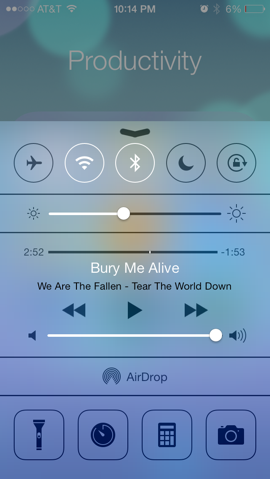
Control Center
Control Center is one of the best additions to iOS 7 even if it is a shamefaced adoption from Android. The panel provides quick access to toggle features like Bluetooth, Wi-Fi and Airplane Mode as well as sliders to adjust volume and screen brightness. There are even shortcuts to useful apps like Clock, Calculator and Flashlight.
To access Control Center, just swipe up from the bottom of the screen.
2
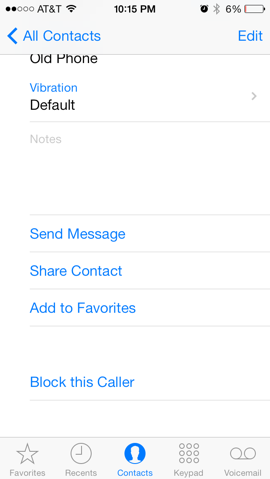
Block contacts
It’s about time Apple implemented a way to block unwanted communications. There are two methods to block offending callers in iOS 7. If someone is already in your address book, simply tap on their profile, scroll to the bottom of the list and select Block this Caller. You can also add numbers to the block list by going to Settings > Phone > Blocked.
Blocked contacts will not be able to call, send messages or initiate a FaceTime video chat.
3
Timestamps in Messages
Timestamps in Messages aren’t exactly new as iOS 6 offered similar functionality. The problem, however, was that the OS would selectively provide timestamps – like when a new conversation was started or after a long period of silence.
With iOS 7, that’s no longer an issue. Simply swipe to the left while in a conversation to see when each message was sent or received. It’s convenient that it the timestamps aren’t always there to serve as a distraction but can be accessed on-the-fly.
4
New Icons
I was unsure whether or not to list this as a positive or negative as people seem to be split pretty evenly across the board. I ultimately see it as a pro simply because A) the old layout and icons were extremely outdated and B) Apple is teasing live apps.
If you haven’t already noticed, the Clock app icon now serves as a watch face. Sure, it’s a little gimmicky and not entirely useful since there is a clock at the top of the screen but if Apple opens such functionality up to developers, we could see all sorts of things like live weather feeds directly on an icon without having to open the app.
We’ll keep our fingers crossed on this one.
5
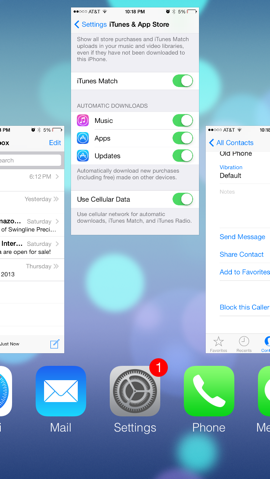
Improved multitasking
Multitasking has been around on Apple devices since iOS 4 but it was really limited. Developers now have a bit more freedom in iOS 7 and the interface to switch between apps is greatly improved. The new system, similar to the jailbreak tweak Auxo, uses a card-based interface to see which apps are open and lets you get rid of them with a simple swipe up.
Along the same lines, a new feature called Background App Refresh allows apps to refresh their content or use Location Services in the background. The feature is enabled by default although some (Apple included) say turning it off could improve battery life.
   
6
Automatic updates
Previous versions of iOS would alert a user when a new update was available for an app with a small badge on the icon. The gesture was nice but it also meant you had to manually update everything. Not anymore.
With iOS 7, app updates take place automatically in the background. The setting seems to be disabled by default so if you’d like to turn it on, navigate to Settings > iTunes and App Store and slide the slider for Automatic Downloads: Updates to the “on” position.

The Bad (or Still Missing)

1
Landscape orientation for all
Apple’s iPad works in landscape orientation under almost every usage scenario, so why doesn’t the iPhone get the same treatment?
I’ve used both devices and can say it’s rather annoying to be restricted to entering a passcode and navigating the home screen on the iPhone in portrait mode only. Sure, it’s a minor inconvenience and one can get to where they want to go even when looking at things sideways but it shouldn’t have to be that way. It wouldn’t take a ton of work on the UI side to allow landscape orientation phone-wide even with the iPhone’s limited real estate.
2
Different default apps
One can’t help but notice that Apple still doesn’t allow users to select a third-party app as a default app. Don’t like Safari? Tough, you’re stuck with it as you can’t replace it with Chrome as your default browsing app. Not a fan of Mail? You’re out of luck again as you can’t set another program like Mailbox as your default client.
From a marketing and strategy standpoint, it makes sense – Apple wants you to use their apps, not someone else’s. But from a user’s perspective, the freedom to use Chrome as default over Safari or Google Maps over Apple’s own app shouldn’t be out of reach.
3
“Select All” option in e-mail app
I’ve had the same e-mail address for several years and as such, I tend to receive a lot of messages each day. It’s not uncommon to get 100+ e-mails a day after spam filtering which is why it’s so annoying to check my e-mail on an iOS device. Why? Because there is no easy way to delete multiple messages.
It’s beyond me how such a basic function has eluded iOS for so long. If you want to delete multiple e-mail messages, you have tap Edit then methodically select each and every message for deletion. A “Select All” feature would be extremely easy to implement and save people like me a lot of time and frustration.
4
Custom keyboards
While it’s true that the keyboard in iOS 7 has undergone some under-the-hood improvements and even a visual makeover (but __why__ remove the .com button?), users still don’t have the ability to use true third-party keyboards. Android users have enjoyed access to popular third-party boards like SwiftKey for some time and we think it’s about time that Tim Cook and company open up the platform to allow for third-party keyboards.
Earlier this year at the D11 conference, Cook promised to open the platform up a bit more but “not to the degree that we put the customer at risk of having a bad experience.” That’s understandable as there would no doubt be some third-party keyboard apps that would offer a bad experience but the potential for some really great keyboards far outweighs the negatives in my opinion.
5
Greater home screen widget control
Or rather, any control at all. Look, I get it. Just as with the custom keyboard argument, Apple doesn’t want to run the risk of having people turn their home screen into a gaudy MySpace profile. But a little more flexibility in the home screen widget department would go a long way in making the overall experience seem a bit more custom-fit for each user.
I suspect Apple will loosen the reins a bit more over time but Android-like home screen customization likely isn’t in the cards.
6
Can’t remove Apple bloatware
The inability to remove pre-loaded Apple software continues in iOS 7. In the event you don’t use apps like Newsstand or Passbook, you’re stuck with them as there is no way to delete them. We’ve seen this on other phones and operating system and it’ll likely continue but truth be told, it’s annoying. Apple should let users uninstall these apps. If you need them again, simply grab them from the App Store.
Until that day comes, you’re stuck with burying these unused apps in a folder and forgetting they ever existed.


Read more

Former Apple engineer reveals secrets behind Jobs' first iPhone presentation

0 comments
It’s been exactly two years to the day since Apple co-founder Steve Jobs died. He was many things to many people at many different places but to most, he is known for creating the iPhone and jumpstarting a smartphone revolution that has forever changed how we communicate on the go.
Publically, it all started on January 9, 2007, when Jobs unveiled the original iPhone at the Macworld conference in San Francisco. What may have looked like an ordinary 90-minute presentation from Jobs was anything but for those behind the scenes. According to Andy Grignon, a senior engineer with Apple at the time, it was practically a miracle.
Unlike other Silicon Valley companies that host canned onstage product demos, Jobs insisted on performing a live presentation. The problem with that was the iPhone at that time – well, the hundred or so that were in existence – were riddled with bugs. For example, the phone could play a section of audio or video but not an entire clip without crashing. If you sent an e-mail then surfed the web, it would work. Do that step in reverse and it’s likely to crash.
This meant the development team had to come up with what they called the golden path – a series of specific tasks performed in a specific order that would be least likely to cause the phone to malfunction. And to combat the issue of getting a reliable cell signal in a room filled with tech journalists, Jobs had Cingular Wireless (now owned by AT&T) bring in a portable cell tower. With his approval, the phones were then programmed to always show five bars of signal strength regardless of true signal strength.
All of that aside, there was still a huge hurdle to overcome. The original iPhone only had 128MB of memory and because the apps weren’t finished, they were all still big and bloated. That meant the handset often ran out of memory and would have to be restarted to free up the RAM. To get around this limitation, Jobs used multiple iPhones on stage – when one ran low on resources, he’d swap it out while the first was restarted.
Jobs practiced his presentation for five days leading up to the launch and according to Grignon, he rarely saw the CEO make it through the 90-minute set without a glitch. Yet on the one run that mattered the most, Jobs pulled off the presentation without incident in front of the world and the rest, as they say, is history.


Read more

Apple launching iPhone 5s and 5c to 35 countries starting October 25

0 comments
After Apple experienced a shortage with its new iPhones at launch, especially with the new gold 5s, the company announced today that its new devices will be coming available in several additional markets by the end of the month.
Apple will launch the iPhone 5s and 5c on October 25 in 25 different countries including Italy, Russia, Czech Republic, Denmark, Finland, Greece, Hungary, Ireland, Latvia, Netherlands, New Zealand, and Spain (to name a few). The new phones will also be available to 10 more countries including Mexico, Malaysia, El Salvador and India next month on November 1. Head below for a full list of markets included in today's announcement.
The new iPhones will be available through Apple's online and retail stores as well as select Apple Authorized Resellers, as per usual.
For more on the iPhone 5s and 5c, head over to our full coverage of the new features along with a complete tear down of both models.
iPhone 5s / 5c international launch dates:
Friday, October 25:
Austria, Belgium, Bulgaria, Croatia, Czech Republic, Denmark, Estonia, Finland, French West Indies, Greece, Hungary, Ireland, Italy, Latvia, Liechtenstein, Lithuania, Luxembourg, Macau, Malta, Netherlands, New Zealand, Norway, Poland, Portugal, Reunion Island, Romania, Russia, Slovakia, Slovenia, South Korea, Spain, Sweden, Switzerland, Taiwan and Thailand.
Friday, November 1:
Albania, Armenia, Bahrain, Colombia, El Salvador, Guam, Guatemala, India, Macedonia, Malaysia, Mexico, Moldova, Montenegro, Saudi Arabia, Turkey and UAE.


Read more

Flickr iOS 7 update allows you to auto upload full res photos to your 1TB of free storage

0 comments
Earlier this year, Yahoo announced a complete redesign of Fickr with additional sharing functionality, full res images and most notably, 1TB of photo storage. Now the company has released an update for its Flickr app that allows users to make better use of the free storage capacity.Today's iOS 7 update enables the application to auto upload photos directly from the iPhone's camera roll to Flickr. It appears as though the images getting auto uploaded are set to private by default until you decide to share them. Yahoo is also bringing auto straighten, which automatically corrects photos, but you can also make further adjustments using the Flickr editor before uploading them.Although there are several other apps, like Dropbox and Google+, that will allow you to auto upload photos in a similar fashion, avid Flickr users should find these additions useful.Previously, some users were having trouble signing-in to Google with the app, but according to Yahoo those issues have been resolved with the update and that it is "making sure it doesn't happen again."

Compatible with iPhone, iPad, and iPod touch, you can grab Yahoo's updated Flickr app for free on the App Store now.


Read more

iOS 7: 5 changes Jony Ive must make

0 comments
ios homescreen
Big changes are afoot with iOS 7. In the past week we’ve heard from a series of Apple insiders saying that Jony Ive is ripping Apple’s mobile operating system apart and starting again.
Word is we’ll be getting a new ‘flat’ look, with the aim of ditching the skeuomorphic stylings of previous software design boss Scott Forstall.
That means less life-like apps and a more modern, cleaner approach.
Here are five features we reckon Ive needs to change in order to make iOS 7 a winner.

1 Game Centre

game centre
It’s hard to love Game Centre, even if you’re an iOS gaming fanatic.
That cluttered, casino table design feels about as un-Apple as it’s possible to get.
It’s truly bizarre when you consider it alongside some of Cupertino’s sleeker and sharper offerings.
Ive is apparently keen to make big changes to Game Centre and it certainly needs it.
Top of our wishlist: less Las Vegas gaming table, more Xbox Live-like looks, with gaming info front and centre.

2 Notes

notes ios
Apple loves the idea of you binning your old-school pad and pen.
But it’s stuck with the same pad-like look for its Notes app since iOS first landed six years ago.
That awful Comic Sans-like font, the binder down the side, the ruled lines - it all feels so dated.
Ive must give this a clean, basic look, while also making it a proper competitor to apps such as EverNote.

3 Maps

apple maps our price
Obvious, but Maps is still in need some serious attention.
This is more down to how Apple can bring in much-needed changes and make its service more accurate, all the while not treading on the toes of excellent offerings from Google and Nokia. Something clean and simple will do the trick.

4 Mail

mail ios
Like Notes, Mail feels stuck in a time warp. Gmail and Mailbox for iOS are both much smarter solutions and look far less cramped and cluttered.
How Ive changes this on the iPhone will be interesting.
Will he bring in more swiping actions to make it feel more intuitive and more integrated? Surely Mailbox will ‘inspire’ him and his team.

5 Newsstand

ios5 newsstand
Like Games Centre, Newsstand’s faux bookshelf design looks pretty naff and doesn’t fit in with the rest of Apple’s design.
Making it look more like a digital store, rather than a second-hand book emporium clad in cheap pine furniture would be a start.
Newsstand is big business for Apple and it can make it even bigger by giving it a complete makeover.


Read more

Google tests Apple's patience with Chrome for iOS API

0 comments

Google is pushing the boundaries of Apple’s iOS regulations, after it revealed a new Chrome API for Cupertino’s mobile operating system.
The new software allows devs to tweak apps so that users can access Chrome for iOS when web browsing in-app.
google app icon
What’s more, users with Chrome installed will be able to open pages directly in Google’s browser when following links.
Until now, Safari has been the default option for users flicking from an app to their browser.
The new tool will allow developers to offer end users the choice of opening web-based material in either Safari or Chrome.
It comes just days after Google updated its Gmail iOS app to allow links within its Apple-flavoured email client to be opened in Chrome.
With Cupertino currently cracking down on App Store-aping add-ons, this is no time for Mountain View to provoke Tim Cook and co.
After unveiling an update which allows Gmail for iOS to bypass Apple Maps and head for Google Maps instead, this is the latest move in an attempt to give fans of Big G apps on Apple’s platform a better service.
Whether Apple sees it like that is another matter.


Read more

iPhone 5S: Sharp to begin production next month

0 comments

Production of Apple’s new top-end iPhone is slated to begin next month, reports suggest, with electronics giant Sharp primed to begin production of LCD Displays for the device.
That’s according to Japanese paper Nikkan Kogyo Shimbun, which says other providers are already hard at work on the so-called iPhone 5S.
Japan Display and LG Display are both rumoured to be augmenting Sharp’s supply of LCDs to Apple.
iphone 5 parts
The iPhone 5S had been initially pegged for a summer release date, but that now appears to have slipped with Tim Cook recently intimating that Apple would release ‘exciting products’ in the autumn.
The delay in manufacturing the iPhone 5S is said to be down to the inclusion of a much-rumoured fingerprint sensor.
Analysts have claimed that getting this piece of tech right is the primary cause of the handset’s hold-up.
While iPhone 5S details remain sketchy, there is a general belief that it’ll follow the iPhone 3GS and iPhone 4S in being an iterative update.
Either way, it seems Apple is happy to stick with its autumn release schedule.
That’s despite fears from tech watchers that in leaving updates so late it’s inviting rivals like Samsung and HTC to pump out more impressive phones.


Read more

iPhone 4 price cut on Vodafone

0 comments
iphone 4 white
Vodafone has cut the asking price of the iPhone 4, offering a saving of nearly £225 over the course of the contract term.
The carrier is now offering the iPhone 4 8GB edition free when customers sign up for a two-year contract at £21 per month. That's down from £29 previously, equating to a saving of £223.50.
Allowances are 600 minutes and 500MB of data per month, as well as unlimited texts.
To qualify for the offer, would-be buyers need to enter the promotional code 3MHPLR at the point of purchase.
Features of the fourth-generation iPhone include a 3.5-inch super high-density retina display, a five megapixel camera with HD video recording and tap-to-focus and a secondary camera.
A dual-core processor is also on board the 9.3mm thick smartphone, as is the Apple Maps mapping software and the FaceTime video-calling app.
As with all iPhones, the iPhone 4 also offers perhaps the world’s largest choice of apps and games at the App Store.


Read more

Apple results: 5 things Cupertino must do to get back on track

0 comments
Apple logo with man talking on iPhone
Apple’s recent quarterly results were hardly a disaster by most major companies’ standards.
But they still represented the first drop in profits in 10 years, with iPhone and iPad sales down on the previous quarter, the former’s performance of special concern as Samsung continues to raise its game.
Tim Cook and co are by no means failing, but here are five things they need to do to get back to the days when they were taking down everything in front of them.

1 Don’t delay the iPhone 6 and budget iPhone

iPhone 5S colours (mock-up)
Tim Cook talked about ‘exciting products’ being released in autumn.
But while Apple has previous in being single-minded about what it thinks the market needs, delaying the iPhone 6 and, more importantly, its budget iPhone until then is surely madness.
Samsung and, to a lesser extent, HTC are releasing budget smartphones this summer and in WWDC, Apple has the perfect opportunity to marry up new software with improved hardware.
Hold back and expect profits to be down again in the next quarter.

2 Ensure iOS 7 is a revolutionary update

ios apps
This is already highly likely, with Jony Ive said to have drafted in OS X engineers to help him fix what has been by Apple’s standards a total disaster.
iOS 6’s bugs and half-baked native apps showed that Cupertino’s software department had become slack.
By making iOS 7 look and feel different, it will also help answer charges that Apple’s operating system has become dated and old-fashioned next to rivals’ more ‘alive’ operating systems.

3 Ditch the hubris

Apple CEO Tim Cook (banner)
Unlikely, but Apple’s hubris knows no bounds and needs to be curbed.
Despite the slip in sales and profits, Cook’s bullishness in the post results conference call showed someone who takes believing in his company to absurd heights.
His dismissal of larger smartphones smacked of desperation. We all know that Apple reversed Steve Jobs’ position on the iPad Mini, after the one-time company talisman called seven-inch tablets a waste of time.
Apple needs to focus on making great kit, not badmouthing the competition.
It’s dull and does nothing for its reputation for singularity and unwillingness to change.

4 Get PassBook up to scratch

passbook
Cook said mobile payments were still in their infancy earlier this week.
Fair enough, but isn’t that because the iPhone lacks NFC and its PassBook is an average excuse for a paperless payment solution?
More companies need to be brought on board and consumers told about its benefits.
Apple almost never talks up this feature, while Google sings from the rooftops about its Wallet solution.
Cupertino is in serious danger of being left behind in this area and has strides to make in order to keep up with rivals.

5 Up the screen size

iphone 6 phablet concept
We touched on this earlier, but the iPhone is crying out for a bigger panel.
Cook said there were issues with pixel density and white balance with bigger screens.
Tell that to your average punter.
This is another case of Apple refusing to believe that others might have got the jump on it and not developing accordingly. An iPhone phablet is essential.


Read more

Samsung Galaxy S4 Mini: how Samsung is taking on iPhone Mini already

0 comments
Samsung Galaxy S4 mini side-by-side Galaxy S4 leaked photo
Samsung seems nailed-on to reveal its new Galaxy S4 Mini this week. There has been speculation surrounding the device ever since the full-sized S4 launched to much hype and hoopla at the start of last month.
We already know that it packs a 4.3-inch HD screen (hardly small), an eight- megapixel camera and will come in single and dual SIM variations.
But beyond following the same pattern as the Galaxy S3 and Galaxy S3 Mini, this device and the timing of its release say plenty about how Samsung plans to take on Apple, and specifically the iPhone Mini.
The smaller Apple handset has been constantly touted since the start of 2013, with Cupertino doing little to deny its plans for a pared-down, budget edition of its best-seller.
Stories about the iPhone Mini have dried up of late though, with suggestions that Tim Cook and co might push the device back into 2014.
iPhone mini unofficial comparison (small image)
There have been conflicting reports about its screen size and design, but the general thinking will surely be along the same lines as the iPad Mini.
That is, smaller, more affordable and with pretty much all the same features as the full-on version.
However, Samsung seems unwilling to take any chances. Its much-leaked phone will apparently get the official nod laster this week, before being released in June or July.
That ties in nicely with Apple’s plans to reveal its iPhone 5S, most likely at its annual Worldwide Developers Conference.
And, of course, there’s a possibility the iPhone Mini could be along for the ride too. With its Galaxy S4 set to hit shelves imminently, Samsung clearly doesn’t want to miss out on punters who have less money to spend, but still want a smartphone.
Currently, the iPhone doesn’t offer that approach, unless you want an old-school iPhone 4 or 4S.
Samsung vs Apple collision
The S4 Mini will be chock full of more impressive tech, which Samsung clearly thinks will make it an easy sell.
Of course, there’s also Samsung’s massive marketing budget to contend with. The S4 Mini will doubtless be touted just as hard as the S4 over the summer, in an attempt to woo as many punters as possible.
Apple will obviously look to go toe-to-toe, but its job of convincing customers in emerging markets will definitely be made harder by Samsung’s new effort.
Whether the S4 Mini turns out to be a great phone is almost beside the point.
It will sell heavily in its early months, giving Apple and other budget Android makers plenty to think about.


Read more

iPhone three times more reliable than Samsung Galaxy smartphones, study shows

0 comments

Apple’s iPhone is the most reliable smartphone currently in market, beating major rivals to earn top marks in a research from FixYa.
The troubleshooting outfit collated 722,558 problems reported by customers with an Apple, Samsung, Nokia or Motorola flagship smartphone. It then compared this with market share data from StatCounter to assign a reliability score to each manufacturer.
Thanks to fewer tribulations relative to its massive install base, the iPhone came top with a score of 3.47. That’s three times higher than its closest competitor Samsung, which managed just 1.21 for the hugely popular Galaxy range.
However, it was bad news for Nokia’s Lumia range with a score of just 0.68 and even worse for Motorola, which came last with a paltry 0.13 due to the numerous troubles encountered by Droid owners.
Samsung Galaxy S3 white official slanted
Naturally, the iPhone’s battery life was the issue that most annoyed its users, especially following the recent iOS 6.1 debacle that caused iPhone 4S handsets to run out of juice much quicker after the update.
Despite this and the odd niggles, the high score goes to show that maybe iPhones are worth paying the premium for after all.
The findings are sure to delight Apple, which has had tough showing at the stock market after failing to meet analysts’ expectations in the last quarter of 2012.
Samsung, on the other hand, will be hoping its soon-to-land Galaxy S4 will be able to finally knock the iPhone off its perch in both sales and customer satisfaction, especially as the latter is an area where Apple has consistently led.
Have you had any issues with your iPhone, Galaxy or any other smartphone? Tell us in the comments section below.


Read more

iPhone 5S: photos of parts leak online, hint at camera upgrade

0 comments

Leaked images of parts purportedly destined for the next iPhone have leaked online, ahead of the phone’s likely debut later this year.
Published by Japanese parts vendor Moumantai and brought to the eager eyes of the western world by our French friends at nowhereelse.fr, the images show a motherboard that we’re assured will feature in Apple’s next effort.
iphone 5s motherboard
Although not much appears to be different from the equivalent iPhone 5 component, changes around the side that hosts the camera suggest that we can probably expect some kind of upgrade of the phone’s snapper.
That tallies with separate reports that Apple will equip the iPhone 5S with a 12 megapixel camera this time around.
Unfortunately, the fact that we only get to see one side of the motherboard in the photo means it’s impossible to discern what sort of processor the handset might pack.
Assuming rumours can be believed, though, this will be a quad-core A7 number that brings the iPhone more in line with beefy Android efforts from Samsung and HTC.
However, the most significant change is thought to be a hugely revamped version of the iOS software that will power the seventh-gen iPhone and will be showcased in June at the WWDC gathering of the devs.


Read more

iPhone 6 concept shows thinner handset with touch-sensitive home button and 12MP camera

0 comments
iPhone 6 concept (black) by Arthur Reis
iPhone renders are a dime a dozen, but for once we have been graced with a concept for Apple’s next flagship phone that seems very much a possibility.
Created by Arthur Reis, a budding designer who aspires to join the ranks of Jony Ive and Shin Nishibori someday, 3D renderings of the iPhone 6 imagine a handset that looks largely identical to iPhone 5 (think: anodised aluminium casing with chamfered edges), but an impressive 20 per cent slimmer at just 6.1mm thick.

The handset also features a 12-megapixel camera with an ‘iSight Pro’ sensor boasting an f/1.8 aperture and a ‘Magic TrackPad’ that replaces the physical home button with a touch-sensitive equivalent.
As far as we’re concerned, this is one of the best iPhone concepts we’ve seen, principally because it doesn’t go crazy on novel or unrealistic features as most concepts do.
Apple is always trying to make its handsets slimmer, so a more slender iPhone is within the realms of possibility. And with Samsung upping the ante with a 13-megapixel camera on the freshly launched Galaxy S4, we can certainly expect the iPhone 6 to match its competition in the imaging stakes.
The iPhone 6 is hotly tipped to land this summer, possibly sometime in July. Although there’s still a chance that Apple might stick to an autumn release cycle for new iPhone launches.
What do you think of Reis’s iPhone 6 concept? Let us know in the comments section below.


Read more

Apple supplier boosts work force for budget iPhone launch

0 comments
iPhone 5 official generic banner
Apple supplier Pegatron is set to raise staffing levels by a colossal 40 per cent in the second half of the year, with the new workers rumoured to be assembling Cupertino’s much-hyped budget iPhone.
While Pegatron itself refused to confirm that the extra workforce would be beavering away on Apple’s latest iPhone, sources have told Reuters that the device is already in the works.
The news agency reports that some Japanese suppliers have already started on early production.
Mass production is scheduled to begin in June, with the device now expected to make an official appearance in the autumn, in line with Tim Cook’s promise of ‘exciting products this fall’.
Pegatron’s hiring drive comes just a month after rival Apple supply-chain mainstay Foxconn added 10,000 new employees to its production lines.
That suggests that Apple is going all out to get every supplier it can working at full capacity on a budget iPhone.
The handset is expected to rock a cheap plastic shell, with talk of a larger screen to compete with the likes of Samsung’s Galaxy range and HTC’s forthcoming M4.
Whether it can capture the lucrative Chinese and Indian markets, however, remains to be seen.


Read more

iPhone 5S to land in June 2013 with NFC and Super HD Retina+ display

0 comments
iPhone 5 black on hand
Apple’s seventh-generation smartphone will be a major update, boasting substantially better specs than its predecessor, an analyst has forecast.
According to Peter Misek of Jefferies, the handset informally dubbed the iPhone 5S will feature a camera and a screen rocking a so-called “super HD” resolution, which we can only assume means higher than 1080p (the iPhone 5 features a ‘sub-HD’ resolution of 1136 x 640).
Moreover, the display - which may be even labelled ‘Retina+’ to reflect the increased pixel count - is also likely to be an IGZO (Indium gallium zinc oxide) variety. This, and we’re paraphrasing Wikipedia here, enables smaller pixels for a higher resolution display than the amorphous silicon typically used for the active layer of an LCD screen.
Fret not, Misek also predicts the 5S will be equipped with bigger battery to cope with the extra drain on juice. Makes sense. But then again, he also reckons that Near Field Communication might finally make an appearance. So take these prophecies for what you will.
The handset is expected to land sometime in June or July, which may seem odd given Apple has opted for an autumn release cycle for the last two iPhones, but some analysts believe that a summer launch may be inevitable after sales of the iPhone took a dive in the two quarters before the release of the latest model.
Another mooted update – or improvement, depending on how you look at it – is the possibility of a 128GB model, and perhaps less plausibly, six to eight colour variants like the iPod touch, which, we think is a bit too far-fetched.
Rumours have been doing the rounds that Apple has already ordered a ‘trial production’ of the iPhone 5S in a relatively small batch of 50-100k units and is expected to go into volume production in the first quarter of 2013, which would make a summer launch very much possible.


Read more

The Man who beating Steve jobs at his own game

0 comments
imageoftelent

Have you heard of Andy Rubin? That’s OK, most people haven’t – Even though today he’s Apple’s greatest threat since Bill Gates in the 1980s.
Andy’s little brain-child, Android, has gone from an idea 7 years ago to now accounting for 72% of the 181 million smart phone global smartphones sold in the last quarter, compared to just 14% for Apple. Android phones are now outselling Apple 5 to 1, with 1.3 million new Android activitations EVERY DAY.
Who is Andy Rubin? He was an engineer at Apple in the early 1990s with Apple’s ‘General Magic’ team, designing the first mobile software platform. He left to create his own operating system and PDA called ‘Sidekick’ – before the ipod was launched. It failed, and by 2003 Andy was back at the drawing board.
Fast forward to 2005, and a meeting between Andy and Google’s Larry Page. Did Larry want to endorse Andy’s new mobile operating system Android? (Named after a robot sidekick). Larry did one better, buying over the entire team, including Andy for somewhere around $50 million, as a way to compete in the new smartphone market. At that point, there was still not a single smartphone using Android. It was simply $50m to buy the invention and the inventor.
Andy got to work at Google. This week, 7 years on, Google’s Eric Schmidt declared victory on the smartphone war with Android, saying to Bloomberg: “This is a huge platform change; this is of the scale of 20 years ago – Microsoft versus Apple. We’re winning that pretty clearly now.”
Today, phones using Android are growing at 92% per year compared to the market at 46%. The growth in China Android is even greater (where Android is on 90% of the smartphones sold) at 2.6x that – and China will have 500 million smartphones by the end of 2013: Double the US market (That’s compared to 200m China smartphones today and only 50m one year ago).
In the 1980s, Apple fell from total dominance of the PC market to just 4% of the market as Microsoft Windows took over from the Mac operating system. The same is happening now with Google against Apple on a whole number of fronts:
The Android store, Google Play, has grown 300% this year compared to the Apple App store’s 13% growth. Google Play downloads will overtake Apple App store in the first half of 2013. This week Google’s map app went straight to the top of Apple’s most downloaded apps, undermining Apple’s reputation of delivering better software. Google is also innovating much faster than Apple on everything from mobile payments to voice recognition.
What am I personally doing in this sea change? Much as I love Apple, we are redirecting more of our efforts on Android apps and Android phones and tablets than on Apple. We’ve translated all our main sites and products to Chinese. And I’ll also be expecting to write about and interview many more Android app millionaires in 2013.
What is Andy’s view on all of this? He prides the openness on Android but, being more of a techie he prefers to let his coding speak for itself.
In 2010 Steve Jobs criticized Android in an open letter, writing ‘”Google loves to characterize Android as open and iPhone as closed. We see this as disingenuous and clouding the difference.’


Read more
 
Share
Blogger Wordpress Tips